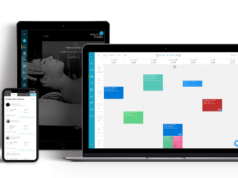

Tablets have become one of the most versatile pieces of technology we own.
They help us take notes in meetings, sketch ideas, stream films, attend video calls, read books, answer emails, edit photos, manage projects, and even replace laptops for many everyday tasks. Lightweight, portable, and powerful, it’s easy to see why devices like the iPad have become essential tools for students, professionals, creatives, and casual users alike.
Yet despite all their advantages, tablets have a hidden downside that rarely gets discussed. Many people use them in ways that encourage poor posture. Over time, this can contribute to neck strain, shoulder pain, headaches, eye fatigue, and reduced productivity.
The irony is that the very thing that makes tablets so convenient—their portability—can also create ergonomic challenges that traditional desktop setups largely avoid. Fortunately, a few simple adjustments can make a dramatic difference.
The ‘Looking Down’ Problem

Unlike desktop monitors, tablets are often used flat on a desk, balanced on a lap, or held in the hands. While these positions may feel comfortable initially, they typically require users to angle their heads downward for extended periods.
The human head weighs approximately 10 to 12 pounds in a neutral position. As the neck bends forward, the effective load on the cervical spine increases significantly. What feels like a slight tilt can place substantial strain on muscles, tendons, and joints over time. This phenomenon has become so common that health professionals often refer to it as “tech neck.”
Although smartphones frequently receive most of the attention, tablets can create similar issues because users often spend much longer sessions reading, writing, drawing, or working on them.
Why Tablets Encourage Poor Posture
The problem isn’t necessarily the device itself. It’s how people naturally use it.
Consider a typical tablet session:
- Reading articles on a sofa
- Taking handwritten notes during a lecture
- Watching videos in bed
- Responding to emails at a kitchen table
- Reviewing documents while traveling.
In each scenario, users often position the screen lower than eye level.
As a result, they unconsciously round their shoulders, crane their necks forward, and maintain awkward positions for extended periods. Because tablets are lightweight and portable, they tend to be used in environments that were never designed for productive work. A dining chair, airport seat, couch cushion, or coffee shop bench rarely provides ideal ergonomic support.

The Impact on Productivity
Poor ergonomics don’t just affect comfort. They can also influence performance.
When muscles become fatigued, concentration often suffers. Discomfort creates distractions. Frequent repositioning interrupts workflow. Tension headaches can reduce focus and energy levels.
Many people assume declining productivity during long work sessions is solely caused by mental fatigue when physical discomfort is contributing significantly behind the scenes. The relationship between comfort and performance is often underestimated. A workstation that supports healthy posture helps users stay focused for longer periods with fewer interruptions.
Why Tablet Users Are Particularly Vulnerable

Laptop users often benefit from established ergonomic advice. Most professionals understand the importance of monitor height, keyboard positioning, and supportive seating when using desktop computers.
Tablet users, however, frequently view their devices differently. A tablet feels casual. It’s something people use on the sofa, in bed, at a café, or while traveling. Because of this perception, many users pay less attention to posture and workstation setup than they would with a traditional computer.
Ironically, this can make tablet users more vulnerable to repetitive strain issues over time. The more versatile the device becomes, the more important proper positioning becomes.
The Importance of Viewing Angles
One of the simplest ways to improve tablet ergonomics is to adjust the screen angle. A screen positioned too low forces users to bend forward. A screen positioned too upright can create glare or visual discomfort. The ideal angle depends on the task being performed.
Reading and Writing
Reading long documents typically benefits from a more upright viewing position that reduces neck flexion and keeps the screen closer to eye level.
Video Calls
Video conferencing often requires an even higher angle to maintain natural eye contact while reducing the tendency to hunch forward toward the camera.
Drawing and Note-Taking
Creative work presents unique requirements. Artists and note-takers often need lower angles that replicate the feel of paper while still providing adequate support for wrists and shoulders.
The key is flexibility.
Different activities require different positions, which is why adjustable stands have become increasingly popular among tablet users.
Creating a Better Workspace Anywhere
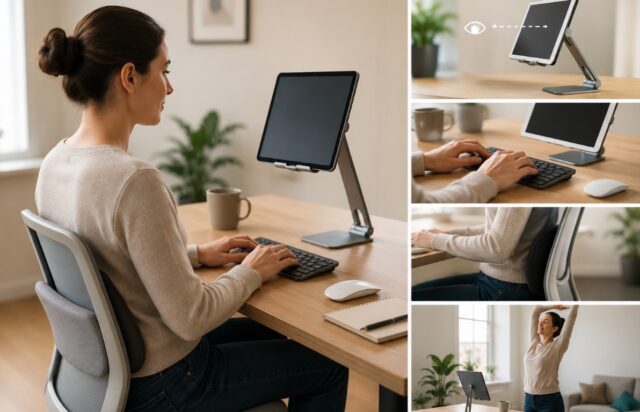
Many people assume ergonomic improvements require expensive office furniture or dedicated workspaces. In reality, small changes often produce the biggest results.
Some practical adjustments include:
Raise the Screen
Whenever possible, elevate the tablet so that the top portion of the display sits closer to eye level. Even modest increases can significantly reduce neck strain.
Use External Accessories
For longer typing sessions, pairing a tablet with an external keyboard can keep the screen elevated while maintaining a comfortable hand position.
Support Your Back
Whether working at home or traveling, choosing seating that supports the lower back can improve overall posture.
Take Regular Breaks
Movement remains one of the most effective ways to reduce strain. Standing up, stretching, and changing positions every 30 to 60 minutes helps prevent stiffness from developing.
Adjust Lighting
Reducing glare and ensuring adequate lighting can minimize eye strain and encourage more natural viewing positions.
The Role of a Good Tablet Stand
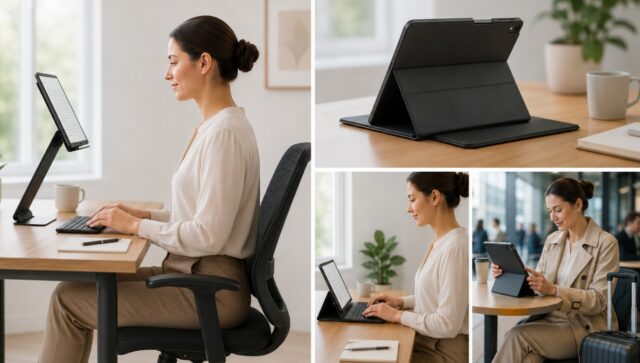
One accessory that often has a surprisingly large ergonomic impact is a high-quality tablet stand or adjustable case. Many basic tablet covers provide only one or two viewing positions, limiting users to a narrow range of postures. More advanced designs allow users to switch easily between reading, typing, presenting, streaming, drawing, and video conferencing modes.
For example, a premium ZUGU iPad case with multiple adjustable viewing angles allows users to adapt their setup to different environments rather than forcing their body to adapt to the device. This becomes particularly valuable for professionals who work from multiple locations throughout the day, including offices, co-working spaces, cafés, airports, and client sites. A flexible setup encourages a healthier posture without requiring additional equipment.
Ergonomics for Students
Students may spend more time using tablets than almost any other group. Digital textbooks, lecture notes, assignment research, collaboration tools, and online learning platforms all contribute to extended screen time.
Unfortunately, studying often happens in environments that aren’t ergonomically ideal. Dorm rooms, libraries, lecture halls, and shared accommodation rarely provide perfect workstation setups.
Simple adjustments such as using an adjustable stand, changing positions regularly, and avoiding prolonged periods of looking down can help reduce discomfort during intensive study periods.
Ergonomics for Remote Workers
The rise of remote and hybrid work has transformed how people use technology. Many professionals now alternate between home offices, shared workspaces, cafés, and travel locations throughout the week.
This flexibility offers tremendous advantages but also creates new ergonomic challenges. Without a consistent workstation, users must rely more heavily on portable solutions that support healthy posture wherever they work. Investing in adaptable accessories can often provide greater long-term value than continually trying to compensate for uncomfortable working environments.
Small Changes, Big Benefits
Most ergonomic problems develop gradually. Few people wake up one day with severe neck pain caused by tablet use alone. Instead, discomfort accumulates through months or years of small habits repeated consistently.
The good news is that the opposite is also true. Small improvements repeated consistently can produce meaningful long-term benefits.
Raising the screen slightly. Changing viewing angles. Taking regular breaks. Using a more supportive stand. Sitting more consciously. None of these adjustments is dramatic. Yet together, they can transform how comfortable, productive, and sustainable tablet use becomes.
As tablets continue evolving into powerful tools for work, creativity, education, and entertainment, paying attention to ergonomics isn’t just about comfort—it’s about ensuring that the technology designed to improve our lives doesn’t quietly create problems of its own.